
Introduction
Not every Ratibi cardholder has access to the internet, a smartphone, or a nearby ATM. But almost everyone has a mobile phone that can make a call. For workers in this situation, the phone balance check method is the most accessible option available — and yet it is one of the least explained. The FAB website lists a phone number but gives absolutely no information about what happens when someone calls, what options to press, or what to expect from the automated system. This guide fills that gap completely. Every step of the Ratibi balance check by phone is explained here — from dialling the number to hearing the balance — so no cardholder is left confused or frustrated.
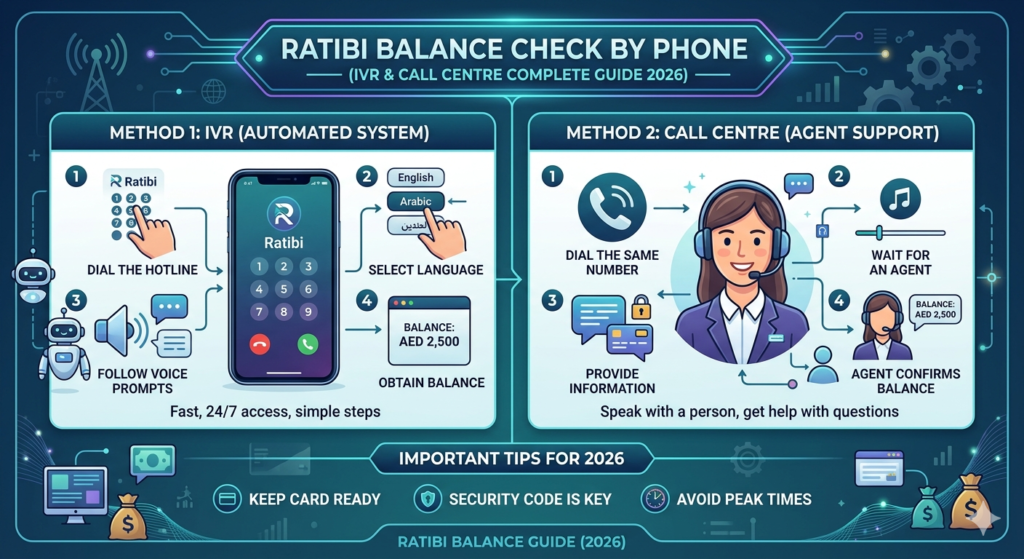
Why the Phone Method Matters for Ratibi Cardholders
Among all the balance check methods available for the Ratibi card, the phone option is uniquely important for a specific group of workers — those who have limited technology access but still need reliable, real-time balance information.
Here is why this method deserves more attention than it typically receives:
Works on any phone — whether it is a basic keypad phone or a smartphone, any device that can make a call can access this service.
No internet required — unlike the Magnati portal or the FAB mobile app, the phone method works entirely without a data connection.
No card needed at the time of the call — unlike the ATM method, the cardholder does not need the physical card in hand to check the balance by phone.
Human support is available — if the automated system does not resolve the issue, the call can be transferred to a live customer service agent who can assist further.
Multilingual support — FAB’s customer care service is available in multiple languages, making it accessible to the diverse workforce that uses the Ratibi card across the UAE.
Available 24 hours a day — the phone service operates around the clock, including weekends and public holidays.
The Official Ratibi Phone Numbers
FAB has dedicated phone numbers specifically for Ratibi card services. These are different from the general FAB customer care line and are designed to handle Ratibi-specific enquiries efficiently.
| Service | Phone Number |
| Ratibi service — within the UAE | 600 52 2298 |
| Ratibi service — outside the UAE | +971 2 499 6279 |
| General FAB customer care — within UAE | 600 52 5500 |
| General FAB customer care — outside UAE | +971 2 681 1511 |
For balance enquiries, the dedicated Ratibi number — 600 52 2298 — is always the best first option. It is specifically set up for Ratibi card services and will reach the most relevant automated menu and support team.
What Is an IVR System?
Before walking through the steps, it helps to understand what an IVR system is. IVR stands for Interactive Voice Response — it is the automated telephone system that answers the call and guides the caller through a menu of options using a recorded voice.
When the Ratibi phone number is called, an automated voice will answer and offer a series of options. The caller presses the corresponding number on their phone keypad to navigate through the menu and reach the balance enquiry option.
This system allows FAB to handle a very high volume of calls efficiently — and for straightforward requests like a balance check, the IVR can provide the information without ever needing to speak to a human agent.
Step-by-Step Guide — How to Check Ratibi Balance by Phone
Step 1 — Dial the Ratibi Service Number
From within the UAE, dial 600 52 2298 from the mobile number that is registered with the Ratibi card. Calling from the registered number makes the verification process faster and smoother, as the system may be able to identify the caller automatically.
If calling from outside the UAE, dial +971 2 499 6279.
Step 2 — Listen to the Welcome Message
Once the call connects, an automated voice will play a welcome message. This message is usually available in both English and Arabic. Listen carefully to the full message before pressing any keys — pressing too early can sometimes interrupt the menu.
Step 3 — Select the Language
The IVR will typically ask the caller to select a preferred language. Press the number indicated on the menu — usually 1 for English or 2 for Arabic. Wait for the confirmation before proceeding.
Step 4 — Navigate to the Balance Enquiry Option
After selecting the language, the main menu will present several options. Listen to all the options before pressing a key. The balance enquiry option is typically listed early in the menu — it may be labeled as:
- “Press 1 for balance enquiry”
- “Press 2 to check your card balance”
- Or a similar instruction depending on the current menu structure
Press the corresponding number on the keypad and wait.
Step 5 — Verify Identity
The system may ask for a verification step to confirm the caller’s identity before sharing balance information. This is a security measure to protect the cardholder. The verification may involve:
- Entering the 16-digit card number using the keypad
- Entering the last few digits of the card number
- Confirming the registered mobile number
Follow the instructions carefully and enter the required digits using the phone keypad.
Step 6 — Hear the Balance
Once identity is confirmed, the automated system will read out the current available balance on the Ratibi card. Listen carefully and note down the figure.
If the balance needs to be heard again, the system usually offers the option to replay the information — listen for that prompt before ending the call.
Step 7 — Speak to a Live Agent If Needed
If the balance check has been completed but there are additional questions — such as a missing salary, a blocked card, or a disputed transaction — the IVR will typically offer the option to speak to a customer service agent. Press the indicated key to be connected to a live representative.
Wait times may vary depending on the time of day. Calling during off-peak hours — early morning or late evening — generally results in shorter waiting times.
Tips for a Smooth Phone Balance Check Experience
Call from the registered number — this is the mobile number that the employer submitted when registering the Ratibi card. Calling from this number speeds up the verification process significantly.
Have the card number ready — even if calling from the registered number, some systems may still ask for the 16-digit card number. Having the card nearby avoids any delay.
Find a quiet place to call — the IVR system uses voice prompts that need to be heard clearly. Background noise from a construction site, a busy kitchen, or a crowded area can make it difficult to follow the instructions.
Do not hang up too quickly — if the system is taking a moment to process the request, it is important to stay on the line. Hanging up too early means starting the process again from the beginning.
Write down the balance — after the automated voice reads out the balance, write it down or take a screenshot of the call duration for reference.
Call during off-peak hours — if the call needs to be transferred to a live agent, calling between 7am and 9am or after 8pm tends to result in shorter waiting times.
What to Do If the IVR Cannot Help
Sometimes the automated system may not be able to resolve a specific issue — for example, if a salary has not been credited, if the card is blocked, or if there is a dispute about a transaction. In these situations, the following steps should be taken:
Step 1 — Press the option to speak to a live customer service agent when the IVR offers it. Explain the issue clearly and provide the card number and registered mobile number for verification.
Step 2 — If the live agent at the Ratibi helpline cannot resolve the issue directly, they will escalate it to the relevant FAB department and provide a reference number for follow-up.
Step 3 — The employer should also be informed, as the employer is the primary point of contact between the worker and FAB. Many issues — particularly those related to salary credits or card registration — can only be resolved through the employer.
Step 4 — If the issue remains unresolved after speaking to both the employer and the FAB helpline, visiting the nearest FAB branch in person with the Ratibi card and any supporting documents is the next step.
Phone Balance Check vs Other Ratibi Balance Methods
| Feature | Phone / IVR | SMS Alert | Magnati Portal | ATM | FAB App |
| Internet required | No | No | Yes | No | Yes |
| Smartphone required | No | No | No | No | Yes |
| Physical card needed | No | No | Yes | Yes | No |
| Human support available | Yes | No | No | No | No |
| Available 24/7 | Yes | Yes | Yes | Yes | Yes |
| Free to use | Yes | Yes | Yes | Mostly | Yes |
| Best for | No internet, needs help | Automatic alerts | Quick online | Receipt needed | App users |
Frequently Asked Questions
Q: Is the Ratibi phone balance check service free? Yes. Calling the FAB Ratibi helpline at 600 52 2298 from within the UAE is charged at the standard local call rate. There is no additional fee from FAB for the balance enquiry service itself.
Q: What if the call is not connecting? Check that the number has been dialled correctly. If the number is correct and the call still does not connect, try calling the general FAB customer care line at 600 52 5500 as an alternative.
Q: Can the call be made from a landline? Yes. The Ratibi helpline can be called from a landline as well as a mobile phone. However, calling from the registered mobile number speeds up the verification process.
Q: Is the IVR available in languages other than English and Arabic? The standard IVR menu operates in English and Arabic. For assistance in other languages such as Hindi, Urdu, or Tagalog, requesting a live agent and asking for a representative who speaks the preferred language is the best approach.
Q: What if the balance read out by the IVR seems incorrect? Note the balance given and immediately check it against a recent SMS alert or the Magnati online portal for comparison. If the discrepancy is significant, speak to a live agent during the same call to raise the issue.
Q: Can the phone method be used to do anything other than check the balance? Yes. The FAB Ratibi helpline can also assist with card blocking, reporting a lost or stolen card, salary enquiries, and other card-related issues — either through the IVR menu or through a live customer service agent.
Final Thoughts
The Ratibi card phone balance check method is one of the most underused yet most accessible options available to cardholders across the UAE. It requires no internet, no smartphone, no app, and no visit to an ATM. A simple phone call to 600 52 2298 — from any mobile or landline — delivers the current balance in under two minutes.
For workers who are unfamiliar with technology, live in areas with limited internet access, or simply prefer speaking to a system or a person rather than navigating a screen, this method offers a reliable and always-available solution.
For a complete side-by-side comparison of all five Ratibi balance check methods — including SMS, ATM, online portal, and mobile app — : How to Check Ratibi Card Balance: All Methods covers everything in one place and is the ideal starting point for all Ratibi cardholders.